A social media content calendar is the single planning surface that schedules what you publish, where, when, and who owns it. Copy a 30-day template or open a shared spreadsheet, block out the next two weeks, and start filling in dates. The rest of this guide covers formats, a five-step build process, ready templates, and how to schedule and test posting frequency.
TL;DR:
- A 30-day planning window strikes the best balance between strategic oversight and flexibility for adjusting to trends.
- For small teams managing under 20 posts per month, a spreadsheet is sufficient, but larger or more complex accounts benefit from integrated scheduling tools.
- Post frequency should be tailored to each platform, with testing of multiple time slots over several weeks guiding optimal timing.
- Proper tagging with content pillars, campaign, and audience details in your calendar improves reporting accuracy and prevents promotional overload.
- Regular monthly review sessions ensure ongoing strategy adjustments, better approvals, and consistent content quality across channels.
Table of Contents
- What Type of Social Media Content Calendar Should You Use?
- How Do You Build a Social Media Content Calendar in Five Steps?
- What Content Pillars and Mix Ratios Keep a Calendar Balanced?
- How Often Should You Post, and What’s the Best Time?
- What Fields and Templates Belong in Your Calendar?
- Practitioner Tips From Running Calendars for Clients
- Running the Monthly Planning Session
- Get Help Building and Running Your Calendar
- Sources
- FAQ
What Type of Social Media Content Calendar Should You Use?
The right format depends on team size and how much automation you actually need. Most teams build calendars three ways: a spreadsheet, a collaborative workflow tool, or an integrated publishing calendar, and each comes with real trade-offs, according to Sprinklr’s breakdown of calendar formats.
- Spreadsheet: best for one or two people managing under 20 posts a month. Fully flexible fields, zero cost, but no built-in approvals or reminders.
- Collaborative workflow tool (Trello, Asana, Notion): fits mid-sized teams that need comments, task assignments, and status tracking without native publishing.
- Integrated publisher (Hootsuite, Sprinklr, Emplifi): justified once you’re publishing daily across four or more platforms and need native scheduling, approval chains, and automated timing recommendations, a shift Emplifi’s calendar guide frames as the direction most growing teams eventually take.
Quick check: if you’re spending more time chasing approvals than writing captions, you’ve outgrown the spreadsheet.
How Do You Build a Social Media Content Calendar in Five Steps?
You can build a working monthly social media content plan in a single sitting. Follow these five steps, then copy the 30-day sample below into your own sheet.
- Set one monthly goal and 3 to 5 content pillars. Pick a single focus (launch awareness, lead generation, community growth) and build pillars around it.
- Audit your channels. Confirm which platforms actually reach your audience and note their time zones before you schedule anything.
- Pick a cadence and set a 4 to 6 week test window. Don’t lock in a permanent posting schedule on day one, since Hootsuite recommends treating early frequency as an experiment, not a rule.
- Build your calendar views. You need a monthly editorial overview, a weekly production sheet, and an evergreen library for recycled content.
- Assign owners and approval lanes, then schedule the first 14 to 30 days so nothing ships without a name attached to it.
A 30-day planning horizon is the sweet spot most teams land on, balancing strategy with the flexibility to react to what’s happening that week, per Later’s research on planning cadence.
Here’s a simplified 30-day sample to copy directly:
| Week | Mon | Wed | Fri |
|---|---|---|---|
| Week 1 | Educational carousel (pillar: expertise) | Behind-the-scenes reel | Customer story/testimonial |
| Week 2 | Product tip (pillar: expertise) | Poll or question sticker | User-generated content repost |
| Week 3 | Industry news commentary | Promotional post (offer/launch) | Evergreen repost from library |
| Week 4 | Team spotlight | Educational carousel | Month recap + next-month teaser |
Swap in your own pillars, but keep the rhythm: education leads, promotion stays limited to one slot a week.
What Content Pillars and Mix Ratios Keep a Calendar Balanced?
Pillars are the categories every post rolls up to, and they should tie directly to your monthly goal, not exist as generic buckets. Three to five pillars is the range most guides land on, according to Creative Manitoba’s content pillar framework — enough to stay varied without fragmenting your reporting.
Two mix ratios cover most situations:
- 40/25/20/15: 40% educational, 25% entertaining, 20% promotional, 15% community/UGC. Works well for brands building authority over time.
- 5-3-2: for every 10 posts, five are curated or educational, three are original brand content, two are direct promotion. Better for lean teams that need a simpler rule of thumb.
Tag every post with its pillar, campaign, funnel stage, and target persona. Mapping each entry to a pillar prevents promotional creep and becomes the primary way you’ll roll up performance later, since pillars turn into your reporting spine rather than an afterthought.
Pro Tip: *Once a month, filter your calendar by pillar and count the promotional-tagged posts.
How Often Should You Post, and What’s the Best Time?
Posting frequency isn’t one-size-fits-all, but starting ranges exist for a reason. Hootsuite’s guidance points to roughly 3 to 5 posts a week for Instagram, while platforms like X tolerate 1 to 2 posts a day without audience fatigue, per Hootsuite’s posting schedule breakdown.
Best posting times vary significantly by platform and by audience, which is why generic “best time to post” charts are a starting point, not a rule, according to Buffer’s analysis of posting-time data.
Time zones, work schedules, and platform algorithm behavior all shift what “peak time” actually means for your specific followers.
Run a structured test instead of guessing:
- Pick two or three time slots per platform and hold cadence steady for 4 to 6 weeks.
- Track reach, engagement rate, and click-throughs for each slot, not just likes.
- After the test window, drop the weakest slot and reallocate that budget to your strongest one.
- Repeat quarterly, since audience behavior shifts with seasons and algorithm updates.
Analytics should replace industry averages once you have a full test cycle of your own data. If your 8 a.m. Tuesday slot consistently underperforms your 6 p.m. Thursday slot, the chart stops mattering. Your numbers win.
What Fields and Templates Belong in Your Calendar?
A complete calendar entry needs more than a date and a caption. At minimum, track: date, time, channel, caption, asset link, content pillar, call to action, owner, status, UTM tag, and a link to post performance once it’s live, a structure that mirrors Emplifi’s recommended calendar fields.
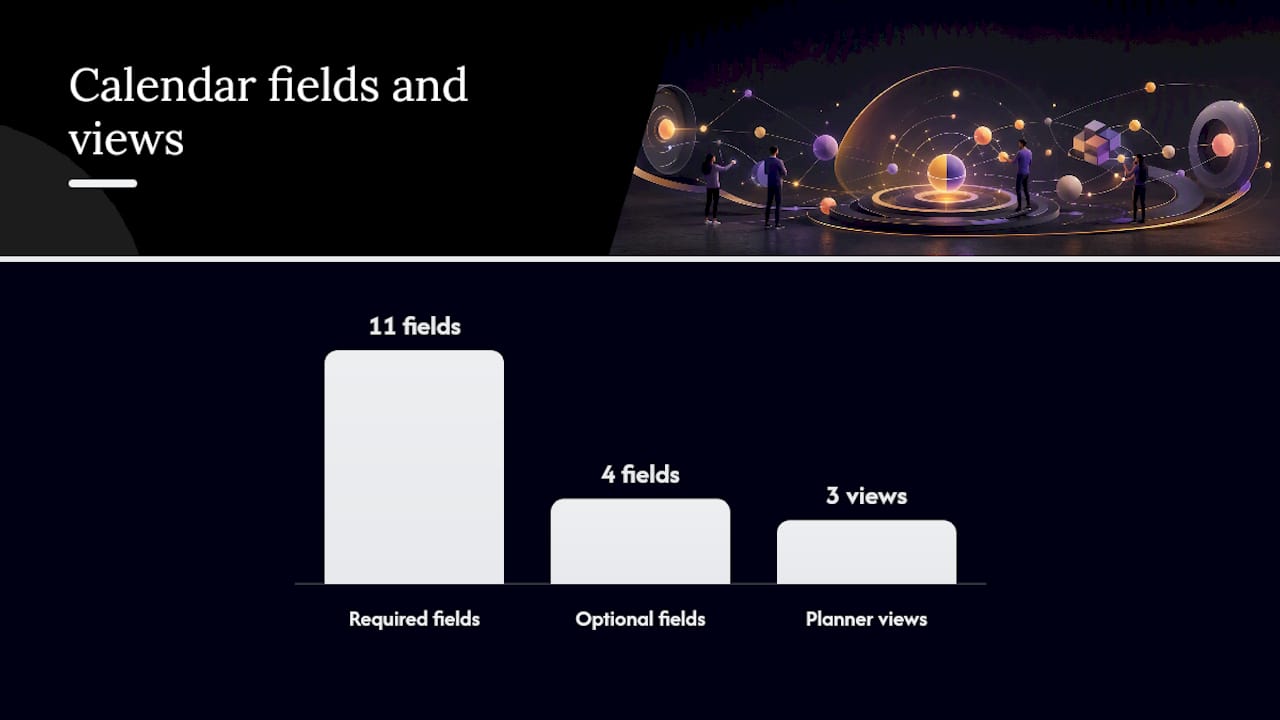
More mature setups add approval state, region or language, asset rights, and cross-team dependencies, giving every entry enough detail to double as a reporting record later, not just a scheduling note.
Three views cover almost every team’s needs:
- Monthly editorial view: the strategic overview, pillars and campaigns visible at a glance.
- Weekly production sheet: granular task tracking, who’s writing, designing, and approving each asset.
- Evergreen library: a running list of high-performing posts you can recycle or repurpose on slow weeks.
Start in Google Sheets. Once approvals or comment threads get messy, migrate the same fields into a collaborative board or an integrated publishing tool without rebuilding your structure from scratch.
Practitioner Tips From Running Calendars for Clients
Some digital marketing agencies have run this process for enough client accounts to know where calendars break down. Missing pillars is the most common failure. Without them, reporting becomes guesswork and every post looks equally important. Inconsistent tagging is a close second. If half your posts say “promo” and the other half say “promotion,” your performance rollups will be wrong.
Batch production saves real time. Shoot or design a week’s worth of assets in one sitting, then reuse variants (different captions, same visual) across platforms instead of starting from zero each time.

Governance matters more than most teams expect. Assign one person as the final approval lane, track asset usage rights, and always link back to post performance once it publishes. Skipping that last step is why so many calendars never improve. For strategy questions specific to your account, a content marketing strategy framework is a useful place to start before your next planning session.
Running the Monthly Planning Session
A monthly planning session, run in 45 to 60 minutes, covers goal setting, pillar review, and slotting the next 30 days, leaving room for timely content to slide in later. The clearest sign it’s working: less ad-hoc scrambling, a more consistent brand voice, and approvals that used to take days now taking minutes. Every month, look at what over- and underperformed, then adjust cadence, pillars, or timing before the next session starts.
— Ruthwik
Get Help Building and Running Your Calendar
There are full-service social media management options that provide calendar strategy, content production, scheduling, and performance reporting handled by one team instead of stitching together freelancers, a scheduling tool, and a designer separately.
That’s the gap most small businesses hit: the calendar template is the easy part, and consistent execution across pillars, platforms, and approval lanes is where momentum stalls. Courimo’s social media management service picks up strategy, content creation, and scheduling so your calendar doesn’t sit half-filled by week three. If paid amplification fits your launch calendar, Google Ads support can run alongside your organic posting plan. Some agencies offer to review your existing calendar and cadence to provide recommendations on what to fix first.
Sources
For deeper reading beyond this guide: Buffer’s best-time-to-post data, Emplifi’s content calendar template, and Sprinklr’s guide to calendar formats each expand on points covered above. Content calendar automation benefits are also covered in Baby Love Growth’s overview of why teams adopt calendars in the first place.
- Best time to post on social media — Buffer
- Social media content calendar: free 2026 template and 12-month editorial plan — Emplifi
- How To Create a Social Media Content Calendar — Sprinklr
- Why the best social teams plan 30 days ahead — Later
- How to create a social media posting schedule — Hootsuite blog
FAQ
What Is a Social Media Content Calendar?
A social media content calendar is a planning document that tracks what you’ll post, on which platform, when it goes live, and who owns each task. It typically includes fields like date, caption, asset link, pillar, and approval status, a structure detailed in Emplifi’s template guide.
How Far Ahead Should I Plan My Social Media Calendar?
A 30-day planning window is the most common recommendation, since it balances a clear strategic view with enough flexibility to react to trending topics. Later’s research points to this as the range most social teams settle on.
How Often Should I Post on Each Platform?
Starting points vary: roughly 3 to 5 times a week works for Instagram, while platforms like X can tolerate one or two posts daily, according to Hootsuite’s posting schedule guidance. Treat any starting number as a hypothesis and test it for 4 to 6 weeks against your own engagement data.
Should I Use a Spreadsheet or a Scheduling Tool?
Start with a spreadsheet if you’re a small team posting fewer than 20 times a month. Move to an integrated publishing tool once you’re managing four or more platforms daily and need built-in approvals, as outlined in Sprinklr’s calendar comparison.
Can Courimo Help Set Up and Manage My Content Calendar?
Yes. Courimo offers social media management covering strategy, content production, and scheduling for small and medium-sized businesses. Pricing is available on request through a consultation.