User generated content ads are paid social creatives built from real customer footage, reviews, or creator-produced clips instead of studio production. They win because audiences trust a peer’s phone camera more than a brand’s lighting rig: UGC ads typically post roughly 4x higher click-through rates and up to 50% lower cost per click than standard branded creative. The primary use case is ecommerce paid social, especially Meta and TikTok campaigns competing for cold-audience attention.
TL;DR:
- UGC ads perform best on cold audiences and categories with visible before-and-after results, especially on TikTok and Reels.
- Authenticity cues such as raw footage, natural lighting, and unpolished presentation significantly improve ad engagement and viewer trust.
- Proper consent and clear disclosure are legally essential, especially if content involves compensated creators or specific claims.
- Consistent weekly workflows for sourcing, briefing, testing, and rotating creative assets are key to scaling effective UGC programs.
- Platform-specific editing and a disciplined testing approach are more critical to success than the overall quality of the original content.
Table of Contents
- UGC Ads at a Glance: What the Evidence Says
- UGC Ad Formats That Work and When to Use Each
- Why UGC Ads Work: The Psychology Behind the Performance
- How to Source UGC and Secure Usage Rights
- Briefing Creators and Running a Weekly UGC Workflow
- Platform-Specific Tips: TikTok, Meta, and YouTube Shorts
- Testing, Measurement, and When to Scale a Winner
- Practical Examples and Reusable Brief Snippets
- FTC Disclosure Rules and Other Compliance Issues
- Integrating UGC Ads Into Your Broader Marketing Strategy
- Common Challenges in UGC Ad Production and How to Fix Them
- Courimo’s Take: What Actually Breaks UGC Programs
- Get Help Running a UGC-Driven Paid Social Program
- Sources
UGC Ads at a Glance: What the Evidence Says
The performance case for UGC advertising rests on a trust gap that’s been true for years and has only gotten more pronounced as feeds get more crowded. Peer recommendations remain among the most trusted forms of advertising, which explains why a shaky iPhone video of a real customer often beats a $10,000 commercial on cost per acquisition.
The stat that matters: Industry benchmarking places UGC-style ads at roughly 4x the click-through rate and up to half the CPC of polished brand creative. That gap shows up most on cold-traffic prospecting campaigns, where a native-looking clip stops the scroll faster than an obviously produced ad.
Where UGC tends to win:
- Cold-audience prospecting on TikTok and Reels, where native content blends into the feed instead of announcing itself as an ad.
- Categories with a visible before/after or a clear problem to solve, like skincare, fitness gear, or home organization.
- Retargeting audiences who already know the brand and just need a nudge from someone who looks like them.
Where it tends to underperform: luxury and premium positioning, where a raw, low-fi clip can undercut the price point the brand is trying to justify, and highly technical B2B products where a customer testimonial can’t demonstrate the feature depth a demo video can.
One compliance point belongs here, not buried later: you need explicit permission before running anyone’s content as a paid ad, not just a comment thanking them for tagging your brand. A public post is not a media release. More on that in the legal section below.
UGC Ad Formats That Work and When to Use Each
Not all UGC looks the same, and matching the format to the funnel stage is where most accounts leave performance on the table. Here’s a taxonomy used when auditing client creative libraries.
Testimonial / talking-head. A customer speaks directly to camera about their experience. This format carries the most social proof and performs best mid-funnel, once a viewer already knows roughly what the product does and just needs reassurance it works. Keep it under 30 seconds; a rambling two-minute testimonial loses more viewers than it converts.
Product demo. The customer shows the product doing its job, opening the jar, assembling the gadget, running the app. This format earns its keep when the product solves a visible, physical problem. A demo of a stain remover lifting a wine spill will always outperform someone simply saying “it works great.”
Unboxing / first reaction. The camera captures a genuine first impression, unwrapping, first use, first reaction shot. This is a cold-audience hook: curiosity carries the first three seconds before the pitch even starts. It works particularly well for products with satisfying packaging or a visual reveal moment.
Before-and-after. Split-screen or sequential transformation content for skincare, fitness, home renovation, or organization products. This format converts hard, but it also draws the most skepticism. Viewers have learned to spot staged lighting and suspicious camera angles, so authenticity cues (same room, same clothes, timestamped) matter more here than in any other format.
Lifestyle / “get ready with me.” Context-driven content showing the product inside a daily routine rather than isolated on a table. Fashion, beauty, and lifestyle categories lean on this format because it sells an aspiration alongside the item, not just the item itself.
Pro Tip: *Don’t lead every ad with the product.
Shopify’s creative guidance backs this format mix, noting that TikTok-style native aesthetics tend to outperform polished formats specifically on short-video placements, regardless of which format you choose. The lesson isn’t “pick one format forever.” It’s building a rotating library so creative fatigue never stalls a winning campaign.
Why UGC Ads Work: The Psychology Behind the Performance
Two forces are doing the heavy lifting here, and understanding both lets you write testable creative hypotheses instead of guessing.
Peer trust beats brand trust. Consumers have been trained by a decade of influencer marketing and review sites to discount brand claims and weight peer opinions heavily. That’s why peer recommendations rank among the most trusted advertising signals available to marketers, well ahead of celebrity endorsements or brand messaging. A customer saying “this actually worked for my acne” carries more persuasive weight than a dermatologist-branded claim, even when both are true.
Native aesthetics lower ad resistance. Feed and For You Page algorithms reward content that keeps people watching, and viewers keep watching content that doesn’t look like an interruption. A UGC clip shot handheld in a bedroom reads as “content” rather than “ad” for the first several seconds, which buys the brand time to make its case before the viewer’s thumb starts moving. Studio-lit, tripod-mounted creative telegraphs “ad” instantly, and the algorithm’s own signals often punish that lower watch time.
Pairing UGC with visible proof compounds the effect. One Feefo case study on a coffee retailer found that displaying verified purchaser reviews alongside UGC-style creative lifted on-page conversion, because the ad’s claim and the landing page’s proof reinforced each other instead of leaving a trust gap between click and purchase.
That gives you three concrete hypotheses worth running in your next test:
- Hook-first vs. product-first. Does opening on a reaction or complaint beat opening on the product shot for your category?
- Objection-handling vs. straight testimonial. Does a creator naming the skeptical thought (“I thought this was a scam until…”) outperform a simple praise-only testimonial?
- Raw vs. lightly edited. Does adding captions and a jump cut improve hold rate, or does it start to look “produced” enough to trigger ad resistance?
Test one variable at a time. Changing the hook, the format, and the CTA in the same creative makes it impossible to know which change moved the number.
How to Source UGC and Secure Usage Rights
You have two practical sourcing lanes, and most mature UGC programs run both simultaneously.
Organic sourcing pulls from customers who already created content: onsite reviews with photo or video attachments, branded hashtag content, comment threads under organic posts, and customers who tag the brand unprompted. This content tends to read as more authentic because there’s no financial incentive baked in, but the volume is unpredictable and the production quality varies wildly.
Paid sourcing works through creator marketplaces, direct outreach to micro-creators in your niche, or dedicated UGC platforms where creators produce content on brief in exchange for a flat fee. This lane is what makes UGC scalable and predictable. Adobe’s guidance on operationalizing UGC is blunt about this: treat content sourcing as a repeatable pipeline, not a lucky find you stumble into when a customer happens to post something great.
Common incentive structures worth testing:
- Free product in exchange for a set number of usable clips.
- A discount code plus a small flat fee for creators who deliver to spec.
- Contest mechanics where the best submission wins a prize, useful for volume but weaker on consistency.
- Straight paid briefs through a creator marketplace, the most reliable option for hitting a weekly production quota.
The rights checklist, non-negotiable: get explicit opt-in consent before you spend a dollar of ad budget on someone’s content. A comment or a tagged post is not consent for paid use. You need a written license or model release that specifically covers paid media placements, not just organic reposting, and it should name the platforms where you intend to run it. Keep dated records of every consent on file; if a creator disputes usage six months later, you need a paper trail, not a memory.
Pro Tip: Build consent capture into your incentive offer itself. A UGC brief that includes a rights clause the creator signs before receiving the product or fee removes an entire follow-up step from your workflow.
Tools that automate consent capture and asset export reduce this friction meaningfully, especially once you’re running more than a handful of creators a month. Manual rights tracking in a spreadsheet works until it doesn’t, usually right when legal asks for proof.
Briefing Creators and Running a Weekly UGC Workflow
A brief that’s too vague produces unusable footage; a brief that’s too rigid produces stiff, obviously-scripted content that undercuts the whole point of UGC. The fix is a tight brief that constrains the essentials and leaves room for the creator’s natural delivery.
Essential fields for every brief:
- Audience and context. Who is this for, and what do they already believe about the problem?
- The hook. The exact first line or first action for the first three seconds, this is the one part worth scripting precisely.
- Product shot requirement. When and how the product must appear on camera, packaging visible, label readable.
- Exact offer and CTA. The specific promo code, price point, or link the creator must reference, word for word if there’s a legal claim involved.
- Tone guardrails. What to avoid, overclaiming, competitor mentions, off-brand language, without scripting every sentence.
Deliverable specs matter just as much as the brief content. Ask for vertical 9:16 footage, both raw and lightly edited versions, burned-in captions on at least one cut, and clear file labeling that ties each asset back to its rights record and test cell. A folder full of unlabeled clips named “IMG_4471.mov” is how creative teams lose track of which content is actually cleared for paid use.
A workable weekly cadence looks like this:
- Monday: Send the week’s brief to your creator roster, three to five creators minimum for a real test.
- Wednesday to Thursday: Deliverables come in, raw and edited cuts, properly labeled.
- Friday: Launch a head-to-head test, same budget, same targeting, different creative, against your current control.
- Following week: Declare a winner based on hook rate and CPA, then route that winner’s traffic to a pre-sell landing page that mirrors the ad’s specific promise instead of dumping traffic on a generic product page.
Adobe’s operational guidance frames this correctly: a UGC program that isn’t running on a repeatable schedule isn’t a program, it’s a series of one-off experiments that never compound.
Platform-Specific Tips: TikTok, Meta, and YouTube Shorts
Each platform rewards a slightly different version of “native,” and shipping the same file everywhere without adjustment is one of the fastest ways to waste good footage.
TikTok punishes anything that smells produced. The first three seconds need to feel like content a friend sent you, not an ad you’re about to skip. Get the hook and a glimpse of the product into frame within that window; TikTok’s own creative guidance and Shopify’s platform analysis both point to native-feeling short hooks as the strongest driver of recall and completion on the platform. Resist the urge to add a polished intro graphic or brand outro, that’s exactly the signal that gets a thumb moving to the next video.
Meta placements (Reels and Feed) have real technical constraints worth respecting. Keep critical text and faces inside the safe zone since Feed crops differently than Reels. Add burned-in captions for sound-off viewing, a large share of Feed traffic still scrolls muted. The first frame functions almost like a thumbnail in Feed placements, so pick a still that reads clearly even with no motion.
YouTube Shorts rewards a slightly different optimization: thumbnail choice actually matters here in a way it doesn’t on TikTok, since Shorts surfaces a static frame before autoplay kicks in on some layouts. You can usually reuse the vertical cut from your TikTok campaign with minor edits, tightened pacing in the first two seconds, a slightly different caption treatment, rather than shooting new footage from scratch.
A few cross-platform habits worth adopting regardless of destination:
- Shoot one longer raw take and crop three placement-specific edits from it instead of shooting separately for each platform.
- Always caption for sound-off, even on platforms where autoplay includes sound by default.
- Test your first frame in isolation before launch, if it doesn’t make sense as a still image, it probably won’t stop the scroll as video either.
Testing, Measurement, and When to Scale a Winner
The measurement stack for UGC ads is simpler than most teams make it, and overcomplicating it is usually why creative testing stalls.
Track these metrics on every test, in this order of priority:
- Thumbstop or hook rate — percentage of viewers who stop scrolling and watch past the first three seconds. This is your creative’s first and hardest test.
- Hold rate at 3 and 10 seconds — whether the hook’s promise gets paid off enough to keep people watching.
- CTR — the standard click signal, but read it alongside hold rate, not alone; a high CTR with a low hold rate often means clickbait that converts poorly downstream.
- CPA and creative-level CAC — the number that actually decides whether a creative scales, viewed at the individual asset level, not the campaign level.
- Frequency and comment sentiment — early warning signs of creative fatigue before CPA starts climbing.
On benchmarks: treat the widely cited 4x CTR and 50% CPC improvement figures for UGC as a directional signal, not a guarantee for your account. Category, audience temperature, and creative quality all move that number substantially. Use it to set expectations for a test, not as a target you’re failing to hit if your lift is smaller.
The scale checklist that keeps a program healthy instead of chasing one lucky winner:
- Brief three creators on the same concept simultaneously, never just one.
- Run a head-to-head test against your current best-performing control.
- Declare a winner using hold rate and CPA together, not CTR alone.
- Route the winner to a dedicated pre-sell page built around that specific creative’s promise.
- Set a refresh trigger, rising frequency or falling hold rate, rather than waiting for CPA to visibly collapse before rotating in new creative.
Practical Examples and Reusable Brief Snippets
Two quick ad outlines and two creator briefs you can adapt this week, built from the formats and workflow above.
Testimonial ad outline. Hook: “I almost didn’t buy this because of the price.” Body: customer explains the specific problem, shows the product in use for five seconds, states one concrete result. CTA: “Use code [CODE] for [discount].” Caption idea: “She almost returned it. Then this happened.”
Unboxing ad outline. Hook: camera catches the box opening with genuine reaction audio. Body: quick reveal, first impression, one close-up of a standout detail. CTA: link in bio or swipe-up to the pre-sell page, not the generic homepage.
Problem-callout creator brief. “Open by naming the exact frustration [audience] has with [problem]. Show your face reacting before showing the product. Hold the product label in frame for at least two seconds. End with the offer code, spoken exactly as written.”
Demo creator brief. “Show the product solving the problem in real time, no cuts during the actual demonstration. State one specific result with a number if possible. Keep total length under 25 seconds.”
Repurposing checklist for turning one raw file into three placement-ready ads: crop to 9:16 if not already, trim the first three seconds for a punchier TikTok cut versus a slightly longer Meta cut, add burned-in captions, and swap the CTA text overlay to match each placement’s landing destination.
FTC Disclosure Rules and Other Compliance Issues
Permission to use someone’s footage solves the rights problem, but it doesn’t solve the disclosure problem, and these are legally distinct issues that trip up marketers constantly.
If a creator received free product, payment, or any other compensation in exchange for content you’re now running as a paid ad, that relationship generally needs a clear disclosure, something like “#ad” or “paid partnership,” visible to the viewer without them having to click through or read a caption in full. This applies whether the content originated organically and you later compensated the creator for usage rights, or whether it was commissioned from the start. The disclosure obligation follows the compensation, not the content’s apparent authenticity.
Beyond disclosure, watch two other compliance areas. First, any specific claim a creator makes on camera, “this cleared my skin in a week,” “this saved me $200,” needs to be substantiated the same way it would if the brand said it directly; a customer’s enthusiasm doesn’t exempt a health or financial claim from truth-in-advertising standards. Second, platform-specific ad policies (Meta’s advertising standards, TikTok’s branded content rules) sit on top of general advertising law and can be stricter, so a UGC ad that clears general compliance can still get rejected or flagged at the platform level.
Build a simple compliance pass into your weekly workflow: check every winning creative for disclosure language, verify any spoken claim against what you can actually substantiate, and confirm the platform’s branded content tools are toggled on when a creator was compensated. It takes five minutes and prevents a much longer cleanup later.
Integrating UGC Ads Into Your Broader Marketing Strategy
UGC ads perform best as one input into a coordinated system, not as an isolated paid social tactic running parallel to everything else the marketing team does.
The clearest connection point is landing pages. A winning UGC ad’s specific hook and promise should carry through to the page it links to; a customer who clicked because of a specific before-and-after claim should land on a page that leads with that same claim, not a generic category page. This consistency between ad promise and landing experience is usually where the second half of a conversion lift actually comes from.
The same winning creative concepts also translate to organic social, email, and even product pages. A testimonial that crushed it as a paid ad often works as a homepage quote or a product page video, extending its value well past the ad account. And UGC pairs naturally with broader campaign strategy work: seasonal promotions, launch campaigns, and retargeting sequences all benefit from swapping in UGC creative at the specific stage where trust, rather than awareness, is the bottleneck.
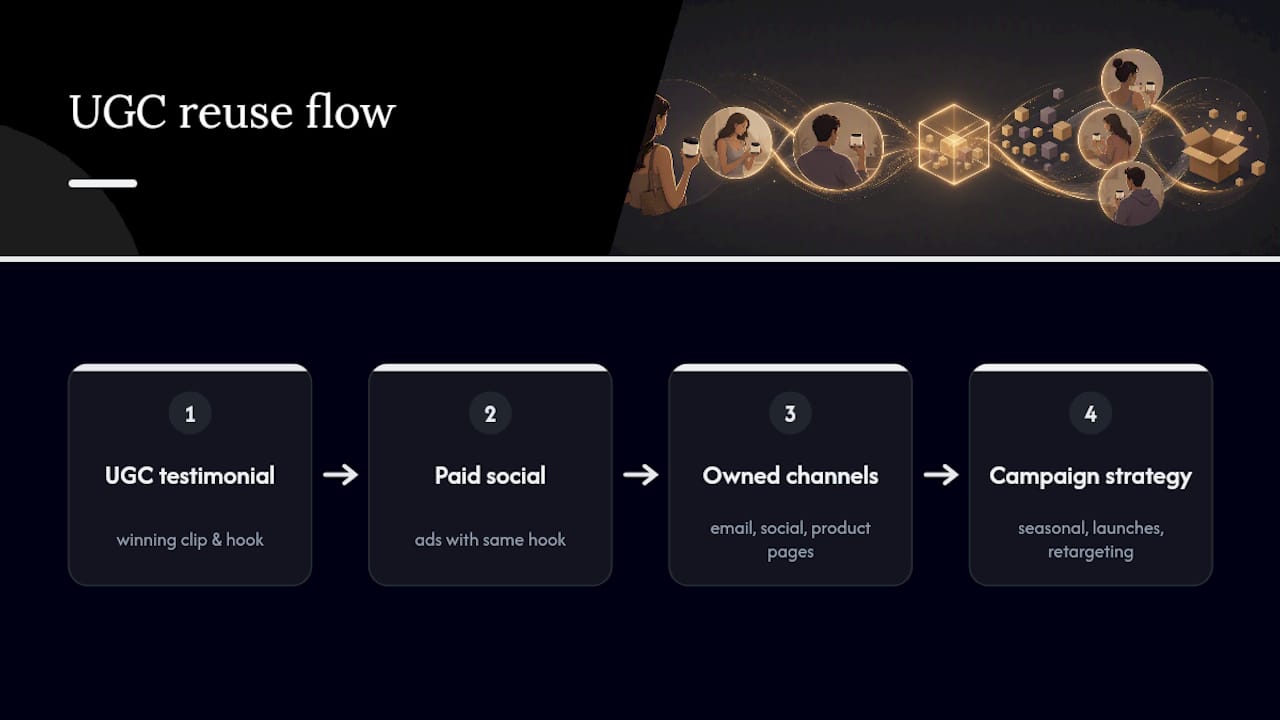
Treat your UGC library as a shared asset across channels rather than something that lives and dies inside the ads manager. A clip briefed for TikTok prospecting can become an Instagram Story highlight, a follow-up email’s hero image, or B-roll for a social media strategy built around retention rather than acquisition.
Common Challenges in UGC Ad Production and How to Fix Them
Most UGC programs stall for the same handful of reasons, and none of them are actually about finding “good enough” creators.
Inconsistent quality across creators. A tight brief with a scripted hook and clear deliverable specs fixes most of this before it starts; loose briefs produce loose footage.
Rights tracking falling apart at scale. Once you’re past a handful of creators a month, spreadsheet tracking breaks down. This is exactly where dedicated tools for consent capture and asset export earn their cost, turning a manual audit risk into an automated record.
Creative fatigue outpacing production capacity. Teams that treat UGC as occasional rather than systematic run out of fresh creative right when a winner needs scaling. The fix is the weekly cadence covered earlier, not a bigger one-time content shoot.
Platform mismatch. A clip cut for TikTok’s native pacing often falls flat when dropped unedited into Meta Feed, and vice versa. Budget time for the placement-specific edits rather than treating one file as universal.
Overproduction sneaking back in. The instinct to “polish” a good UGC clip, adding music, transitions, brand intros, frequently kills the exact authenticity that made it work. If a clip is testing well raw, resist the edit-room urge to improve it.
None of these are exotic problems. They’re workflow problems, and they respond to workflow fixes: tighter briefs, better rights tools, a real cadence, and platform-specific final edits.
Courimo’s Take: What Actually Breaks UGC Programs
Most UGC programs don’t fail because the content is bad. They fail because nobody owns the pipeline, briefs go out inconsistently, rights get tracked in someone’s inbox, and testing happens by gut feeling instead of head-to-head comparison. Courimo’s pay per click and social media work keeps circling back to the same lesson: the creative format matters less than the discipline behind producing and testing it every single week.
The agencies that get UGC right treat it like a media buying discipline, not a content hobby. That distinction is the entire program.
— Ruthwik
Get Help Running a UGC-Driven Paid Social Program
UGC creative testing and paid social management can run as a standing service with a weekly cadence that supports a steady content pipeline.
That means a consistent creator roster, briefs that actually get followed, rights tracked properly, and winning creative routed to matching landing pages instead of a generic product page. If your current UGC efforts feel more like scattered experiments than a working system, that’s usually a sourcing and testing gap, not a creative talent gap. Courimo’s Google Ads and PPC team offers a free creative audit to look at your current UGC performance and flag where the biggest lift is sitting unused. Request your audit and get a straight answer on whether your creative or your targeting is the actual bottleneck.
Sources
- What are UGC ads? | Feefo
- User-generated content (UGC): a guide to getting started | Adobe for Business
- UGC ads: What they are and how to use them | Shopify
- UGC Ads: Top Reviews into Meta & Google Creative | Quoli