Performance Max is a goal-based campaign type that uses Google’s AI to run bidding, creative selection, and placement decisions across Search, Display, YouTube, Gmail, Maps, and Discover within one campaign. The best strategy for 2026 is simple to state and hard to skip: confirm your conversion tracking is accurate, build a real asset library, and load audience signals before you shift budget into it. Do that groundwork first, or nothing else in this guide will save the campaign.
TL;DR:
- Achieving “Excellent” Ad Strength requires at least 20 diverse text assets and one tailored video to optimize creative combinations effectively.
- Audience signals such as Customer Match and remarketing lists help the AI find better matches, but they should be refreshed monthly to avoid outdated targeting.
- Successful Performance Max campaigns depend on accurate conversion tracking, a well-structured asset library, and setting realistic ROAS targets based on actual margins.
- Most underperforming campaigns fail due to broken tracking, inadequate asset quality, or unrealistic ROAS goals, and pausing to fix fundamentals often outperforms continuous tweaking.
- Expect a minimum of four to six weeks of patience before evaluating performance, with careful monitoring of spend, creative quality, and placement issues during the ramp-up.
Table of Contents
- What Is Performance Max and When Should You Use It?
- What Uplift Can You Realistically Expect From Performance Max?
- How Should You Structure Asset Groups and Campaigns?
- What Assets Do You Need to Hit “Excellent” Ad Strength?
- How Do Audience Signals Steer the AI?
- Which Bidding Strategy Should You Choose?
- How Long Should You Wait Before Judging Results?
- How Do You Read Performance Max Reports and Fix Problems?
- What Mistakes Sink Most Performance Max Campaigns?
- How Courimo Approaches Performance Max for Clients
- The Playbook Beyond Google’s Own Guidance
- Ready to Put Performance Max on Autopilot the Right Way?
- Sources
What Is Performance Max and When Should You Use It?
Performance Max isn’t a replacement for Search or Shopping campaigns. It’s a single campaign that pulls inventory from every Google surface at once and lets machine learning decide where your budget works hardest, based on the goals and inputs you feed it.
The differences from older campaign types matter. A Search campaign lets you bid on specific keywords and control match types directly. Standard Shopping gives you granular control over product groups. Performance Max hands most of that granular control to Google’s algorithm in exchange for reach across channels a single Search or Shopping campaign can’t touch on its own.
That trade-off works well in specific scenarios:
- You have at least 30 to 50 conversions per month feeding the algorithm reliable signal.
- Your landing pages are fast, mobile-friendly, and match the intent of the ad groups pointing to them.
- You sell a product catalog through Google Merchant Center, or you have a clear, singular conversion goal like lead form fills or calls.
- You’re already running Search and want incremental reach, not a full replacement for it.
If your tracking is shaky or your monthly conversion volume is thin, Performance Max will struggle to learn, no matter how good your assets are.
What Uplift Can You Realistically Expect From Performance Max?
Google reports that advertisers who add Performance Max to their existing account see an average 27% increase in conversions or conversion value at a similar cost per acquisition or return on ad spend. That number comes from advertisers who already had a working Search or Shopping foundation and layered Performance Max on top of it, not from businesses starting cold.
Google Ads Data: Advertisers who raise their Ad Strength rating to “Excellent” see, on average, a 6% increase in conversions compared to weaker asset ratings.
Both figures come with real caveats:
- A 27% lift means little if your break-even ROAS math is already underwater, since scaling a losing campaign just loses money faster.
- Ad Strength measures asset diversity and relevance, not guaranteed performance, so “Excellent” doesn’t override a poor offer or a slow landing page.
- Uplift compounds on a functioning account. Businesses without solid product-market fit or clean conversion tracking rarely see anything close to those averages.
Treat these numbers as what’s achievable with disciplined setup, not a promise attached to flipping a campaign live.
How Should You Structure Asset Groups and Campaigns?
Asset groups work best when each one represents a single coherent idea, not a grab bag of products or offers. Google’s algorithm optimizes creative combinations within an asset group, so mixing unrelated themes muddies the signal it needs to match the right ad to the right person.
A few rules that hold up across accounts:
- Group by theme, not convenience. Build one asset group per product category, funnel stage, or promotion, rather than dumping your whole catalog into one group and hoping the AI sorts it out.
- Split into separate campaigns when goals diverge. Regional pricing, a distinct ROAS target, or a genuinely separate catalog (say, wholesale versus retail) each justify its own campaign rather than another asset group.
- Use search themes deliberately. Add 5 to 10 search themes per asset group that reflect actual buyer language, not just product names, to help Google understand intent it can’t infer from your feed alone.
- Name everything for audit speed. A naming convention like
PMax_Retail_Winter_USsaves hours later when you’re troubleshooting which asset group is underperforming.
Pro Tip: Keep one asset group per campaign when your catalog is small or your goal is singular. Splitting a thin account into five thin asset groups only starves each one of the volume it needs to learn.
What Assets Do You Need to Hit “Excellent” Ad Strength?
Ad Strength isn’t a vanity metric. It’s the clearest signal Google gives you about whether your asset group has enough raw material to run creative combinations at scale, and it correlates with real conversion lift when it climbs to “Excellent.”
Google’s own guidance sets 20 total text assets and at least one video as the recommended baseline for reaching “Excellent.” Skipping the video asset matters more than most advertisers assume: without one, Google often auto-generates a video from your images, and those rarely perform as well as something you shot or built intentionally.
On refresh cadence: don’t swap assets weekly chasing marginal gains. Replace an asset only when it’s rated “Low” performance for several weeks running, or when the offer itself changes. Frequent asset churn resets learning on that specific asset without meaningfully improving the group.
How Do Audience Signals Steer the AI?
Audience signals aren’t targeting in the traditional sense. Performance Max treats them as a starting point, a hint about who converts, and then expands well beyond that list if the algorithm finds better matches elsewhere. Skipping signals entirely just means a longer, blinder ramp-up.
The signals worth prioritizing:
- Customer Match lists, built from your CRM or email list, give Google your highest intent-quality data.
- Remarketing lists work well when they’re active. Google’s own optimization guidance recommends keeping at least 100 active users in a remarketing list over the past 30 days for meaningful coverage.
- Custom intent audiences, built from search terms and URLs your buyers actually engage with, help in categories without much first-party data yet.
- Similar segments extend your best existing lists to lookalike users at scale.
Search themes deserve a mention here too. They’re not full audience targeting, but they tell the AI what queries should trigger your assets, which matters most in asset groups covering niche or technical products where Google’s automated matching alone may miss intent.
Pro Tip: Refresh your Customer Match list monthly. A stale list built from last year’s customers steers the algorithm toward people who already bought once, not people who are about to.
Which Bidding Strategy Should You Choose?
Bidding strategy comes down to one question: do you know the dollar value of each conversion, or just the volume you want? That answer decides everything else.
- Choose Maximize Conversion Value with a target ROAS when you track order value or lead value with confidence. This lets the AI chase your highest-value customers instead of the cheapest ones.
- Choose Maximize Conversions with a target CPA when every conversion is roughly equal in worth, such as a single lead form with one downstream sales process.
- Set your target ROAS based on your actual break-even math, not an aspirational number pulled from a competitor’s case study. If your margin needs a 400% ROAS to be profitable, don’t set a target of 250% and hope volume fixes it.
- Audit your conversion actions before switching strategies. If “Add to Cart” and “Purchase” are both firing as primary conversions, the algorithm is optimizing against a diluted signal, not your actual revenue goal.
- Use conversion value rules to weight conversions that matter more, like new customers versus repeat buyers, so the AI’s optimization target matches your real business priorities.
How Long Should You Wait Before Judging Results?
Patience is the least glamorous, most consistently ignored part of Performance Max strategy. Google’s own guidance is direct: run a new campaign for 4 to 6 weeks minimum before evaluating it, and expect another 1 to 2 weeks of turbulence after any major edit, like a bid strategy change or a big asset group overhaul.
A cadence that actually respects the learning phase looks like this:
- Weeks 1 to 2: Watch spend pacing and impression volume only. Resist touching bids or assets.
- Weeks 3 to 4: Check Ad Strength ratings and early cost-per-conversion trends, but avoid major structural changes.
- Weeks 5 to 6: Make your first real evaluation. Compare against your break-even target, not against day-one expectations.
- Monthly, ongoing: Run one deliberate experiment at a time, whether it’s a new bid target or a new asset group, and give each one its own full learning window before drawing conclusions.
- Quarterly: Audit audience list health, refresh stale creative, and review placement exclusions across the account.
Changing two variables at once during the ramp-up period is the single most common reason advertisers misdiagnose a campaign as broken.
How Do You Read Performance Max Reports and Fix Problems?
Four reports do most of the diagnostic work: search terms insights, asset-level performance ratings, the placement report, and demand forecasts under insights. Search terms insights in particular reveal queries you didn’t know you were showing up for, which you can feed straight into negative keyword lists or new Search campaigns.
Common fixes, matched to common symptoms:
- Low spend or impressions: check budget caps first, then verify your target CPA or ROAS isn’t set too aggressively for the account’s history.
- High CPA: review asset-level ratings for “Low” performers and check whether Final URL expansion is sending traffic to irrelevant pages.
- Irrelevant placements: add placement exclusions and negative keywords at the account level; Performance Max respects both.
- Final URL expansion concerns: it drives a real average uplift of over 9% in conversions when left on, but turn it off for specific URLs if it’s routing traffic to pages that don’t convert.
What Mistakes Sink Most Performance Max Campaigns?
Nearly every underperforming Performance Max campaign traces back to one of three root causes: broken conversion tracking, an unrealistic ROAS target set before the account had any performance history, or a thin asset mix that never got past “Poor” or “Average” Ad Strength.
Watch for these red flags:
- Conversions drop sharply right after an account-wide tracking or tag change.
- The campaign is spending at a negative margin for more than two full learning cycles.
- Ad Strength stays “Poor” past week six despite adding new assets.
- A single asset group is trying to sell products with wildly different price points or margins.
Pro Tip: Pause, don’t panic-edit. If a campaign is bleeding money past week six, pausing it and rebuilding the asset group cleanly almost always beats a string of small tweaks layered onto a broken foundation.
The decision rule is straightforward: iterate when the fundamentals (tracking, margin, asset quality) are sound but performance is still maturing. Pause when one of those fundamentals is actually broken, because no amount of AI optimization fixes bad inputs.
How Courimo Approaches Performance Max for Clients
Every Performance Max account starts with a tracking audit, because no bidding strategy survives contact with broken conversion data. From there, the build follows the same sequence outlined above: audit-ready assets, segmented asset groups, audience signals loaded before launch, not bolted on after.
The decision of whether to manage this in-house or bring in outside help usually comes down to bandwidth and asset production capacity. A marketer who can dedicate real weekly hours to reviewing search terms insights, refreshing creative, and resisting the urge to over-edit during ramp-up can run this internally. A team stretched across other channels, or one without in-house design and video capacity to hit the recommended asset counts, tends to get more out of Google Ads management handled by a dedicated agency.
The Playbook Beyond Google’s Own Guidance
Google’s official documentation gives you the mechanics: hit “Excellent” Ad Strength, wait 4 to 6 weeks, load audience signals. What it doesn’t tell you is that most advertisers fail before any of that matters, because they turn on Performance Max expecting it to fix a weak offer or a leaky checkout page.
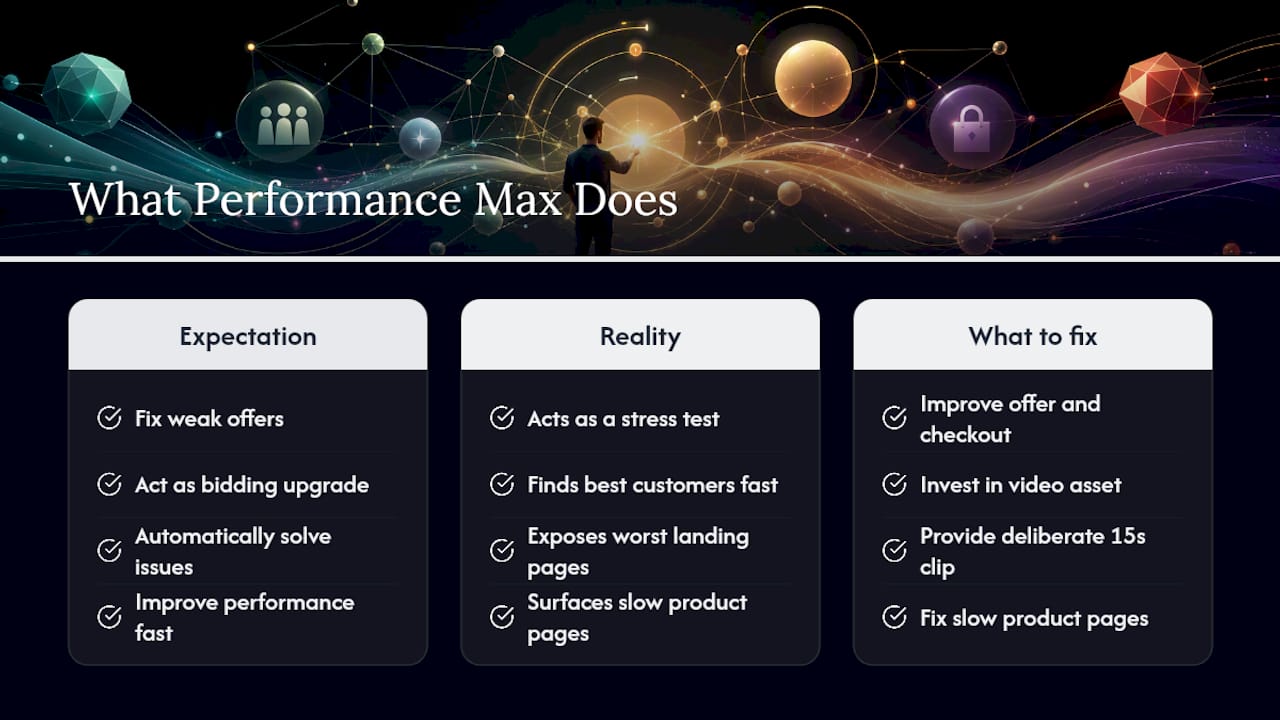
The conventional advice treats Performance Max as a bidding upgrade. It’s closer to a stress test. It will find your best customers faster than a manual campaign ever could, and it will also find your worst landing page, your slowest-loading product pages, and your weakest asset group just as fast. The uplift numbers Google publishes are real, but they describe accounts that already had their fundamentals in order before flipping the switch.
If there’s one place readers consistently underinvest, it’s the video asset. Skipping it feels harmless since Google fills the gap automatically, but that auto-generated substitute rarely represents the brand or offer the way a deliberate 15-second clip does. Fix that one gap before touching bid strategy, and most of the “AI won’t work for us” complaints quietly disappear.
— Ruthwik
Ready to Put Performance Max on Autopilot the Right Way?
Setting up Performance Max correctly means juggling asset production, audience list maintenance, conversion value rules, and a six-week patience test, on top of everything else running your business. The entire buildout includes tracking audits, asset group architecture, creative production, and the bid strategy math that keeps a target ROAS tied to your actual margins instead of a guess.
Where a lot of accounts stall is the ongoing maintenance between launches, refreshing assets before they go stale, catching a tracking break before it burns three weeks of budget, and reading placement reports closely enough to spot problems early. That’s the work a certified Google Ads agency handles as a matter of routine rather than an occasional fire drill.
If your current campaign is stuck at “Average” Ad Strength or you haven’t launched Performance Max yet because the asset requirements feel like too much to produce alone, request a strategy session and get a straight assessment of what your account needs before you commit another dollar of budget to it.
Sources
- About asset group and ad strength guidance – Google Ads Help
- Multiply conversions with Performance Max – Google Ads (Business)