An SEO site migration stays safe when you do six things before touching production: freeze your baseline rankings and analytics, export a complete URL inventory, build a 1:1 redirect map, confirm staging noindex tags are stripped at launch, push live 301 redirects, and check Google Search Console daily for two weeks after. Start now by crawling your site and pulling your Search Console data into one URL inventory spreadsheet. That single file becomes the backbone of everything else you do.
TL;DR:
- The most critical risk during migration comes from domain changes, which can take two to four months to recover if not managed carefully.
- Building a comprehensive redirect map prioritized by traffic and backlinks helps prevent ranking losses, with server-side 301 redirects being the best practice.
- Pre-migration checks should include a full site crawl, Google Search Console data export, backlink profile backup, and verifying staging environment settings to avoid accidental SEO blocking.
- The first 48 hours post-launch are crucial for confirming redirects, removing staging noindex tags, and submitting sitemaps to catch major issues early.
- Recovery time varies by migration type, with redesigns recovering in weeks and domain moves potentially taking months, emphasizing the importance of careful planning and monitoring.
Table of Contents
- What Types of Site Migrations Carry the Most SEO Risk?
- What Should Be on Your Pre-Migration SEO Checklist?
- How Do You Build a Redirect Map That Actually Works?
- What Belongs on Your Staging Environment Checklist?
- What Do You Check in the First 48 Hours After Launch?
- How Long Does Recovery Take and What Should You Monitor?
- What Are the Most Costly Site Migration Mistakes?
- What Does an Agency-Managed Migration Actually Involve?
- When Should You Cut Corners and When Should You Delay?
- Get Migration Support From Courimo
- Where to Verify the Official Rules and Tools
- Sources
- FAQ
What Types of Site Migrations Carry the Most SEO Risk?
Not every migration carries the same danger. A domain change or a full platform rebuild puts far more at stake than a visual redesign, and knowing which category you’re in tells you how much runway to budget.
Domain changes (moving from old-domain.com to new-domain.com) are the riskiest single change you can make, because every backlink, every trust signal, and every ranking history point Google associates with a URL that no longer resolves the same way. Protocol changes (HTTP to HTTPS) are comparatively low risk today since most crawlers handle these smoothly, but they still require redirects and canonical updates. CMS or platform migrations (WordPress to a headless setup, Shopify to Magento) tend to break URL structures, metadata, and structured data unless someone maps every template by hand. URL structure reorganizations, like flattening a folder hierarchy or removing date stamps from blog posts, look simple but touch every single page on the site. Redesign-only projects that keep the same URLs and same domain are the safest category. Multi-site consolidations, where you merge two or three domains into one, combine nearly every risk factor above.
Recovery windows vary by category:
- Redesign-only with unchanged URLs: often no visible ranking dip at all.
- Protocol change alone: typically a few days to a couple of weeks.
- URL restructuring on the same domain: usually 4 to 8 weeks to stabilize.
- CMS or platform migration: often 6 to 12 weeks, longer if templates weren’t mapped carefully.
- Domain change: commonly 2 to 4 months, sometimes longer for large sites with deep backlink profiles.
The combinations that cause the worst outcomes are the ones that stack changes: a rebrand that swaps the domain, moves to a new CMS, and restructures URLs all in the same weekend. If your project checks more than one of those boxes, split the work. Do the platform migration first, stabilize for a month, then handle the domain change separately. It costs you more calendar time but it isolates variables when something goes wrong, and something always goes a little wrong.
What Should Be on Your Pre-Migration SEO Checklist?
The work you do before a single line of code changes determines whether your SEO migration checklist actually holds up under pressure.
Here’s the order that actually works:
- Run a full site crawl. Tools like Screaming Frog give you the inventory of truth: every live URL, its status code, title, H1, meta description, and canonical tag. This file becomes your reference point for everything downstream.
- Export your Google Search Console data. Pull queries, landing pages, clicks, impressions, and average position for at least the last 90 days, ideally 12 months for seasonal businesses. Grab your SEO audit checklist results too if you’ve run one recently.
- Snapshot your GA4 analytics. Sessions, conversions, and revenue by landing page, segmented by organic traffic specifically, become your recovery yardstick later.
- Take a rank-tracker snapshot of your top 100 to 200 keywords the week before launch, not the day of.
- Export your backlink profile. Ahrefs, Semrush, or your existing tool will show which pages attract the most referring domains. Those pages get top priority in redirect mapping, because losing link equity on a page with 200 referring domains hurts far more than losing it on a page with two.
- Decide your migration approach. Big-bang (everything switches at once) works for smaller sites. Phased rollouts, where you migrate sections over weeks, reduce risk on larger sites but require redirect logic that handles a mixed state.
- Set your success metrics and rollback plan before launch, not after something breaks. Define what “recovered” looks like in numbers, and know exactly how you’d revert if index coverage collapses.
- Schedule the cutover during a low-traffic window for your business, and make sure the people who need to be reachable actually are.
- Build your redirect spreadsheet now, even though the actual mapping happens in the next phase. Set up columns for old URL, new URL, redirect status, priority tier, backlink count, and verification status so you’re not scrambling to structure this under launch-week pressure.
Pro Tip: Archive your entire site with the Wayback Machine before migration day, even if you already have a crawl export. A crawl gives you structure and metadata; an archived snapshot gives you rendered pages you can visually compare against the new site when someone asks “wait, didn’t that page used to have a comparison table?”
Stakeholders routinely underestimate how much coordination this takes, and the Semrush research on this backs it up directly: setting realistic timelines and success metrics before any technical work starts is what separates a smooth migration from a chaotic one and outlines how to use AI for SEO the right way. If you’re also redesigning templates as part of this project, review what you need before redesigning your website so design decisions don’t quietly break the SEO plan you just built.
How Do You Build a Redirect Map That Actually Works?
A 1:1 redirect map, where every old URL points to its single most relevant new equivalent, is what preserves the link equity Google has built up for your domain over years. Google’s own site-move documentation is explicit about this: map old URLs to new ones directly, use server-side permanent redirects, and verify both properties in Search Console before you flip the switch.
Prioritize the mapping work by traffic and backlinks first, not alphabetically and not by whatever order pages happen to sit in your CMS export.
A few rules that separate a clean redirect map from one that quietly bleeds rankings:
- Use server-side 301 redirects as your default. A 308 is acceptable when you need to strictly preserve the HTTP request method, but 301 covers the vast majority of migration cases.
- Never rely on 302 redirects for permanent moves. Google treats 302s as temporary, which means it may keep the old URL indexed instead of transferring signals to the new one.
- Avoid JavaScript redirects and meta-refresh tags entirely. They’re slower for users, unreliable for crawlers, and give you no clean way to verify status codes at scale.
- Flatten redirect chains. If page A redirects to B, which redirects to C, collapse that into a single A to C redirect. Chains longer than two hops waste crawl budget and sometimes lose signal strength entirely.
- Find chains at scale by crawling your redirect list with Screaming Frog’s redirect chain report, or by running a bulk header check against your full URL list and flagging anything with more than one hop.
Testing matters as much as building the map. Once redirects are live, sample your top 50 to 100 URLs by traffic and backlinks, and check each one manually or with a scripted curl request that confirms the status code and final destination. Automated crawls catch volume; spot-checking your highest-value pages catches the mistakes that would hurt most if missed. Pull your top external backlink targets and click through from the referring page itself, since sometimes a redirect works fine when tested directly but fails when the link uses an old parameter or trailing slash variant.
Google’s guidance also notes that redirects should stay live for a substantial stretch, often 12 months or longer, to give ranking signals time to fully transfer. Don’t clean up “old” redirects six weeks after launch just because your server logs show declining traffic to them. That decline is expected. Removing the redirect too early is not.
What Belongs on Your Staging Environment Checklist?
Staging environments cause more accidental disasters than almost any other part of a migration, mostly because the settings that keep staging safely hidden from Google are the exact settings that will tank your new site if they accidentally ship to production.
Before anything goes live, confirm your staging site carries a noindex meta tag and a robots.txt that disallows crawling entirely. Then, separately, confirm your production build has neither. This sounds redundant until you’ve seen a launch where a developer copied the staging robots.txt file into the production deploy by mistake, and nobody noticed for nine days.
Run through this list on staging before cutover:
- Update self-referencing canonical tags so every page canonicals to its new URL, not the old one and not the staging domain.
- Check hreflang tags if you run multiple language or regional versions, since a broken hreflang cluster can quietly serve the wrong language version to entire markets.
- Migrate structured data intact. Validate every schema type (Product, Article, FAQPage, LocalBusiness) against Schema specifications and test actual pages with the Structured Data Testing Tool before launch, not after.
- Preserve meta titles, meta descriptions, and image alt text through the platform switch. CMS migrations in particular love to silently truncate or strip these fields during import.
- Generate your new XML sitemap and validate it lists only live, indexable URLs, not staging URLs or redirected pages.
- Verify your new property in Search Console ahead of launch day so you’re not scrambling to prove domain ownership while traffic is already dropping.
What Do You Check in the First 48 Hours After Launch?
The first two days after cutover are when you catch catastrophic mistakes before they compound into weeks of lost rankings. Work through these in order:
- Confirm redirects are live by sampling your top 50 pages by traffic and backlinks, checking that each one returns a 301 and lands on the correct new URL, not a near-match or a homepage catch-all.
- Remove any staging noindex tags and double-check your live robots.txt allows crawling of every section you want indexed. Then submit your new XML sitemap to both Google Search Console and Bing Webmaster Tools.
- Verify canonical tags point to the new URLs, confirm analytics and tag manager containers fire correctly on the new domain or template, and click through your top three or four user journeys (homepage to product, search to checkout, blog to contact form) to catch broken functionality that has nothing to do with SEO but will tank conversions anyway.
- If your domain changed, submit the Change of Address tool in Search Console, but only after you’ve verified redirects are live and working. Submitting too early, before redirects are confirmed, can create a confusing signal history. Google will display a migration-in-progress notice for up to 180 days once submitted correctly, which gives you a rough window for how long the transition process runs.
Skipping step one and jumping straight to sitemap submission is a common shortcut that backfires. If your redirects are broken, submitting a sitemap full of URLs that can’t yet be properly linked from the old domain just wastes crawl budget on a broken foundation.
How Long Does Recovery Take and What Should You Monitor?
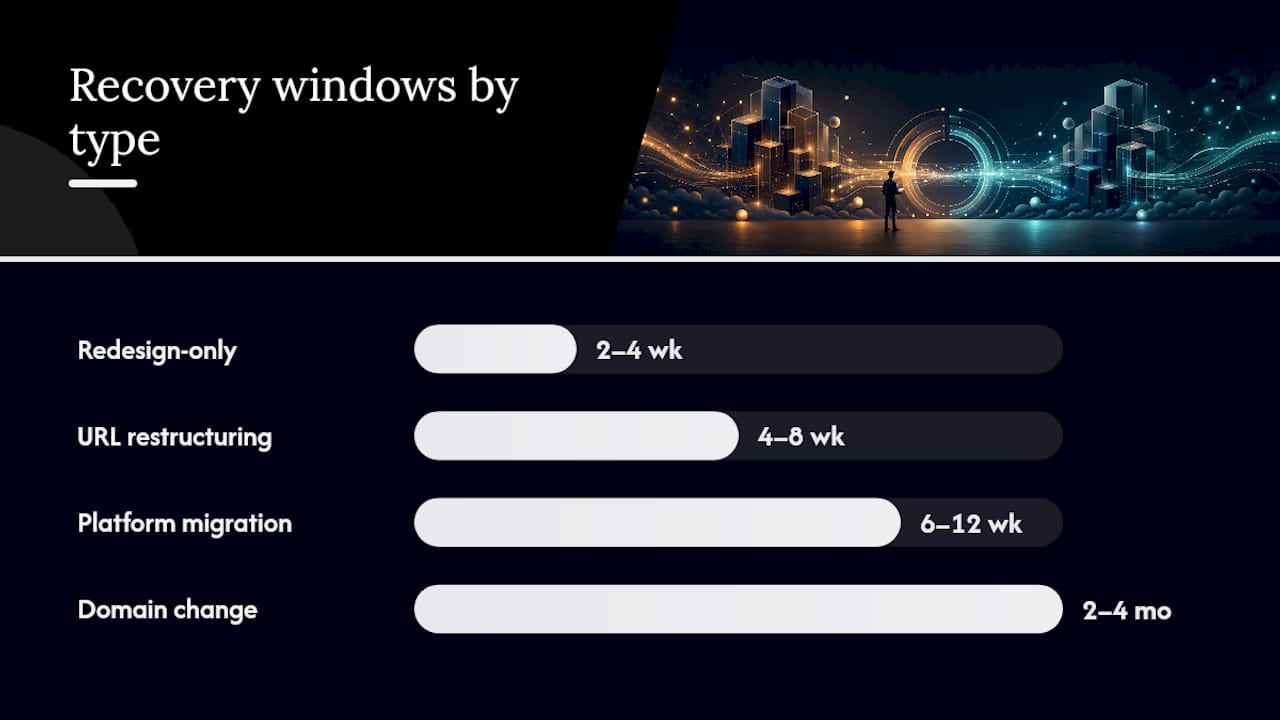
Recovery timing depends entirely on migration type, but the monitoring cadence should be the same for everyone: daily checks for the first two weeks, then weekly through the 90-day mark.
During those first fourteen days, watch Index Coverage in Search Console closely. A spike in “Not Found,” “Redirect error,” or “Duplicate, submitted URL not selected as canonical” tells you exactly where the map broke. Run the URL Inspection tool on your highest-priority pages to confirm Google sees the new version as indexable and canonical.
What the data shows: Industry checklists consistently point to the same three root causes behind major post-migration ranking losses: missing redirects, staging noindex tags that carried over to production, and redirect chains that dilute or break signal transfer. All three are catchable in the first 48 hours if you’re actually looking.
Compare your rankings and organic traffic against the baseline you froze before launch, and prioritize fixes by where you’re losing the most, not where the problem is easiest to fix.
Common culprits worth hunting for specifically:
- Redirect chains that formed accidentally when old plugins or CMS rules stacked on top of your new redirect rules.
- Canonical mismatches where a page canonicals to a URL that itself redirects elsewhere, creating a loop Google won’t resolve cleanly.
- Missing structured data that didn’t survive the template migration, quietly costing you rich results you used to have.
- Broken internal links pointing to old URL patterns instead of the redirected destinations, which forces crawlers through unnecessary hops.
Typical recovery windows run 2 to 4 weeks for redesign-only projects, 4 to 8 weeks for URL restructuring, 6 to 12 weeks for platform migrations, and 2 to 4 months for domain changes, assuming your redirect map was solid at launch.
What Are the Most Costly Site Migration Mistakes?
The single most damaging mistake is shipping a noindex tag or a blocking robots.txt rule from staging straight into production. It’s invisible in a browser, since the page renders fine, but it tells every crawler to skip the page entirely. Check this within the first hour of launch by fetching your robots.txt directly and spot-checking page source for noindex meta tags on a sample of pages across every major template.
Redirecting everything to your homepage instead of the actual equivalent page is the second-most common failure. Google treats a mass homepage redirect as a soft 404: it looks like a redirect on the surface, but the destination has nothing to do with the original content, so Google often stops trusting the signal and drops the page from the index anyway. For pages that genuinely have no equivalent on the new site, a proper 410 (Gone) status is more honest than a fake redirect, or redirect to the closest relevant parent category if one exists.
QA before launch should specifically catch:
- Analytics and tag manager containers that silently stopped firing on the new templates.
- Core Web Vitals regressions introduced by a new theme or unoptimized image pipeline.
- Broken forms, checkout flows, and internal search that have nothing to do with rankings but will hurt revenue immediately.
Pro Tip: If you see a large traffic drop in the days after launch, don’t start guessing. Check redirects first, canonical tags second, and Search Console crawl errors third. That order catches roughly 90% of migration disasters because those three things are, per Search Engine Land’s guide, the most common root causes across the board.
What Does an Agency-Managed Migration Actually Involve?
A structured agency workflow generally runs through five phases: audit and baseline capture, redirect mapping, staging verification, launch-day quality assurance, and roughly 90 days of post-launch monitoring. Each phase produces a document or export the next phase depends on, which is exactly why skipping steps under time pressure causes so much damage.
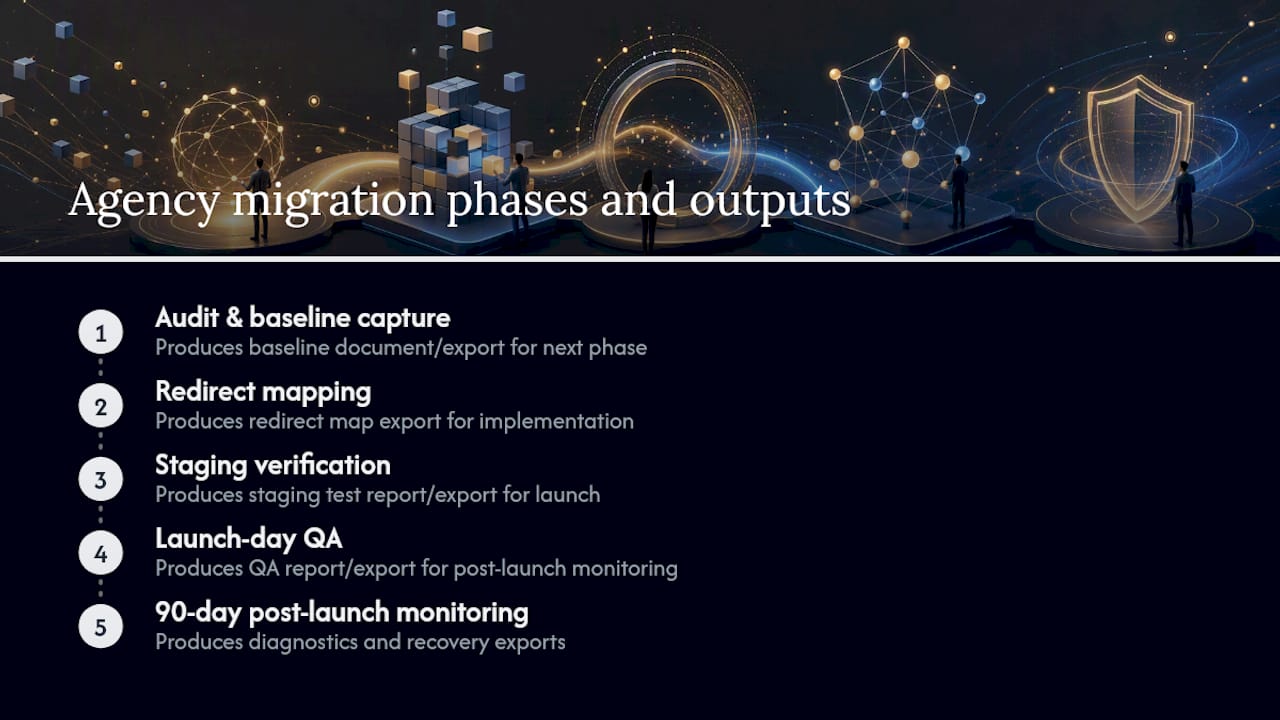
Agencies typically handle full redirect implementation at scale across thousands of URLs, run automated and manual testing across every major template, manage backlink outreach if high-value referring domains need updated links, and provide recovery diagnostics if rankings dip further than expected. That last piece, diagnosing exactly what broke and why, is often where in-house teams get stuck, since it requires comparing crawl data, Search Console signals, and analytics simultaneously. Working with a digital agency for SEO-friendly structure means someone has already built the diagnostic process instead of inventing it mid-crisis.
When Should You Cut Corners and When Should You Delay?
If you’re short on time, protect four things without exception: your baseline exports, a 1:1 redirect map for your highest-traffic pages, correct index settings on staging, and a manual redirect check on launch day. Everything else is negotiable under pressure. Those four aren’t.
Those numbers signal a systemic gap, not a one-off typo you can fix after launch.
Set stakeholder expectations early: rankings dip before they recover, and that’s normal, not a sign something went wrong. Put a rollback plan in writing before launch day, not during the panic that follows a bad Search Console report.
— Ruthwik
Get Migration Support From Courimo
Some digital marketing agencies run migration-specific SEO work for businesses that don’t have the internal bandwidth to babysit a redirect spreadsheet for three months straight. That’s the practical trade-off: an in-house team can absolutely do everything covered above, but it eats weeks of focused attention most marketing teams don’t have free, especially with a launch date already on the calendar.

Migration support from certain agencies often covers the phases that cause the most damage when rushed: a pre-launch audit and baseline capture, redirect mapping assistance for large URL sets, launch-day quality assurance across key templates, and extended post-launch monitoring to catch index coverage problems early. Whether an agency makes sense over handling it in-house usually comes down to site scale and risk tolerance. A 40-page brochure site with unchanged URLs rarely needs outside help. A 5,000-page ecommerce catalog switching platforms and domains at the same time is a different calculation entirely.
If your migration is on the calendar and you want a second set of eyes on the plan before you touch production, request an SEO quote from Courimo and get a read on what the redirect mapping and monitoring work would actually involve for your site.
Where to Verify the Official Rules and Tools
- Google Search Central’s site-move documentation lays out the official rules for URL mapping, redirects, and property verification.
- The Change of Address tool in Search Console is the correct way to notify Google of a domain change once redirects are confirmed live.
- The Structured Data Testing Tool confirms your schema markup migrated correctly and validates against actual Schema specifications.
- The Wayback Machine lets you pull historical snapshots of your old site to compare content parity if pages seem to have gone missing.
Sources
- Change of address – Search Console Help
- Move a site with URL changes – Google Search Central
- The Complete Website Migration Checklist SEO-Friendly
FAQ
What Is SEO Migration?
SEO site migration is the process of moving a website to a new domain, platform, URL structure, or protocol while preserving its search rankings and organic traffic. It requires mapping every old URL to a new equivalent, redirecting properly, and monitoring Search Console closely after launch.
Is SEO Still Worth It in 2026?
Yes. Organic search remains one of the highest-ROI channels for sustained traffic, and a migration only threatens that ROI if it’s handled carelessly. Firms like Courimo’s SEO team in Montreal treat migrations as a defensive project precisely because the upside of organic traffic is worth protecting.
How Can I Migrate My Website Without Losing My SEO?
Freeze your baseline metrics, build a complete 1:1 redirect map prioritized by traffic and backlinks, use server-side 301 redirects, keep staging noindexed until launch, and monitor Google Search Console daily for the first two weeks after cutover. Missing even a small percentage of high-value URLs in your redirect map is the most common cause of significant traffic loss.
How Long Does It Take to Recover Rankings After a Migration?
Recovery windows range from 2 to 4 weeks for a redesign-only project up to 2 to 4 months for a full domain change, assuming the redirect map was accurate at launch.