Implement JSON-LD LocalBusiness markup on every location page, choosing the most specific subtype your business fits (Restaurant, Dentist, PlumbingService, and so on). Match name, address, phone, and hours exactly to your Google Business Profile, add precise geo coordinates, then paste the code and run it through Google’s Rich Results Test before you consider the job done.
TL;DR:
- Using the most specific subtype of LocalBusiness, such as Restaurant or Dentist, enhances eligibility for richer search features and should match your business’s actual classification.
- Google mandates that
name,address,telephone, andurlbe precise and consistent with your Google Business Profile, with at least five decimal places for geo coordinates.- Proper JSON-LD markup should be placed in a
<script type="application/ld+json">block on each location page and validated through Google’s Rich Results Test before going live.- Common schema errors include mismatched NAP details, generic
LocalBusinesstype instead of specific subtypes, and duplicate or outdated@idvalues that confuse search engines.- Ongoing schema maintenance should be systematic, with regular validation, updates for business changes, and monitoring via Search Console to prevent data drift that harms local search rankings.
Table of Contents
- What Is LocalBusiness Schema, and Why Does Google Prefer JSON-LD?
- Which Properties Does Google Require for Local Business Schema?
- What Does a Working LocalBusiness JSON-LD Example Look Like?
- How Do You Add and Validate the Schema on Your Site?
- Why Isn’t Your Schema Working? Common Errors and Fixes
- How Often Should You Check and Update Your Schema?
- When Does Local Schema Implementation Need an Agency?
- The Real Gap in Most Schema Advice
- Get Your Local Business Schema Built and Monitored Correctly
- Sources
- FAQ
What Is LocalBusiness Schema, and Why Does Google Prefer JSON-LD?
LocalBusiness is a type defined by Schema, and it doesn’t stand alone. It inherits properties from both Place and Organization, which is why a single LocalBusiness block can carry a street address (a Place trait) and an official name and logo (an Organization trait) at the same time. That inheritance is what lets search engines treat your business as a single, well-defined entity rather than a loose collection of text on a page.

Structured data exists to remove ambiguity. A page might say “Open until 9 PM” in plain text, but a crawler has no reliable way to know if that refers to today, every day, or a typo. Wrapping that fact in schema turns it into a labeled data point a machine can parse with certainty, which is the mechanism behind rich results, map pack details, and increasingly, how AI answer engines describe your business when someone asks a chatbot “is this place open right now.”
Google explicitly recommends JSON-LD as the preferred format over Microdata or RDFa, mainly because of how it’s built:
- It lives in a single, self-contained script block instead of being scattered across HTML attributes.
- It’s easier to generate dynamically from a database or CMS field, which matters if you manage more than one location.
- It’s simpler to validate, edit, and version-control without touching your page’s visible layout.
- It separates structured data from design, so a redesign doesn’t force you to rebuild your markup.
For a solo location or a fifty-location franchise, JSON-LD is the format that scales without becoming a maintenance headache.
Which Properties Does Google Require for Local Business Schema?
Google’s documentation splits LocalBusiness properties into two tiers, and confusing one for the other is the most common reason schema fails validation.
Required properties, according to Google’s Local Business structured data guidelines, are:
name— the exact legal or trading name of the business.address— structured as aPostalAddressobject, not a single text string.telephone— a full number, ideally with country code.url— the canonical URL of the business’s page.
Skip any of these and your listing risks being ignored for rich result eligibility entirely.
Recommended properties add precision and unlock more display options:
geo— latitude and longitude as aGeoCoordinatesobject.openingHoursSpecification— structured hours, not a text blob like “Mon-Fri 9-5.”image— a representative photo, ideally the same one on your Google Business Profile.priceRange— a simple indicator like$$for cost expectations.sameAs— links to verified social profiles or directory listings that confirm identity.
One formatting detail trips up more sites than any other: Google requires geo.latitude and geo.longitude to carry at least five decimal places. A coordinate like 45.5017 is too coarse; 45.50170 or more decimal places is what the spec actually expects for mapping precision.
Other formatting rules worth locking in before you write a single line of code: phone numbers should include the country code (+1 for Canada and the US), postal codes go in postalCode rather than jammed into streetAddress, and hours use 24-hour time in HH:MM format inside opens and closes fields, never “9am to 5pm” as free text.
Pro Tip: Copy your address, phone number, and hours directly from your Google Business Profile into your schema instead of retyping them. A single mismatched digit between the two is enough to create the NAP inconsistency that undermines local ranking signals.
What Does a Working LocalBusiness JSON-LD Example Look Like?
Here’s a baseline JSON-LD block for a single-location business with a public street address:
{
  "@context": "https://schema.org",
  "@type": "LocalBusiness",
  "@id": "https://example.com/#localbusiness",
  "name": "Example Hardware Co.",
  "url": "https://example.com",
  "telephone": "+15145551234",
  "image": "https://example.com/images/storefront.jpg",
  "priceRange": "$$",
  "address": {
    "@type": "PostalAddress",
    "streetAddress": "123 Main Street",
    "addressLocality": "Montreal",
    "addressRegion": "QC",
    "postalCode": "H2X 1Y6",
    "addressCountry": "CA"
  },
  "geo": {
    "@type": "GeoCoordinates",
    "latitude": 45.50170,
    "longitude": -73.56730
  },
  "openingHoursSpecification": [
    {
      "@type": "OpeningHoursSpecification",
      "dayOfWeek": ["Monday", "Tuesday", "Wednesday", "Thursday", "Friday"],
      "opens": "09:00",
      "closes": "17:00"
    }
  ]
}
The @id field deserves attention most guides skip. It’s a stable, unique identifier that lets other markup on your site (breadcrumbs, articles, reviews) reference this exact entity instead of accidentally creating a duplicate one.
For a restaurant, swap the @type to Restaurant and add servesCuisine and menu so Google understands the specific subtype rather than defaulting to the generic parent type:
| Field | Generic LocalBusiness | Restaurant subtype |
|---|---|---|
@type | LocalBusiness | Restaurant |
| Cuisine data | Not supported | servesCuisine: “Italian” |
| Menu link | Not supported | menu: URL to menu page |
| Reservation info | Not supported | acceptsReservations: true/false |
If your business serves customers without a public storefront, like a mobile locksmith or a home cleaning service, drop the street address and use areaServed instead, listing city or region names or a GeoCircle with a radius. Every value in these blocks, whether it’s a phone number or a business hour, needs to match what’s actually visible somewhere on the page. Schema that contradicts visible content is a policy violation, not just a technical error.
How Do You Add and Validate the Schema on Your Site?
You have three realistic paths to generate LocalBusiness markup, and each fits a different situation.
- Hand-code it if you’re comfortable with JSON and manage a handful of locations. It’s the most precise option and gives you full control over every field.
- Use a JSON-LD generator tool to produce a starting template, then edit the values yourself. This speeds up the first draft but still requires manual review for accuracy.
- Use a CMS plugin (common on WordPress and Shopify) if you’re managing dozens of locations and need the schema to populate automatically from existing business fields.
Once the code is ready, place it inside a <script type="application/ld+json"> tag in either the <head> or the <body> of the page. Google reads both locations the same way, so pick whichever your CMS makes easiest to maintain consistently. If you run multiple locations, use one distinct JSON-LD block per location page, each with its own @id. Never repeat one location’s block across pages meant for a different address.
Validation follows a specific order Google documents clearly. Run the code through the Rich Results Test first to confirm it’s eligible for enhanced display. After deployment, check Search Console’s structured data reports periodically, since that’s where live errors and warnings actually surface once Google has crawled the page in production.
Pro Tip: Test in a staging environment before pushing to production, and keep the previous version of your markup saved somewhere. If a new field causes an unexpected validation error, you want a fast rollback, not a scramble.
Why Isn’t Your Schema Working? Common Errors and Fixes
Most LocalBusiness schema failures trace back to five repeatable mistakes.
- NAP mismatches. If your schema lists a different suite number or phone extension than your Google Business Profile or a major directory, that inconsistency undermines the entity-matching signals search engines rely on. Audit all three sources side by side and correct the outlier.
- Overly generic typing. Tagging a bakery as plain
LocalBusinessinstead ofBakeryorFoodEstablishmentthrows away eligibility for subtype-specific rich result features. Always drill down to the most specific applicable subtype. - Review markup on the wrong page. Google’s guidelines are explicit that you should only mark up reviews or ratings that are genuinely visible on that same page. Pulling in aggregate ratings from a third-party platform without displaying them yourself risks a manual action.
- Duplicated location blocks. Copy-pasting one location’s full JSON-LD onto a different location’s page, forgetting to update the
@idand address, creates conflicting signals about which entity actually operates at which address. - Missing uniqueness in
@id. Every location needs its own stable identifier. Reusing the same@idacross a multi-location business tells search engines those are the same entity, which they aren’t.
Fixing these isn’t about adding more markup. It’s about making the markup you already have internally consistent with itself and with what’s visible on the page.
How Often Should You Check and Update Your Schema?
Structured data isn’t a set-it-and-forget-it task. Treat it the way you’d treat your website’s content calendar, not a one-time technical checkbox.
- Review Search Console’s structured data enhancement reports on a recurring basis, prioritizing errors over warnings since errors typically block eligibility entirely.
- Update the schema block anytime your Google Business Profile changes, whether that’s new hours, a new phone line, or a relocation.
- Do spot checks after holiday hour changes, seasonal menu updates, or any marketing campaign that alters what’s on the page, since schema that lags behind visible content creates the exact mismatch Google flags.
- Keep your
@idvalues stable over time so that other markup, like breadcrumbs or blog posts referencing the business, can reliably point back to the same entity.
Pro Tip: Set a recurring calendar reminder tied to your Google Business Profile updates. If you update your hours there and forget your schema, you’ve just created the mismatch you were trying to avoid.
When Does Local Schema Implementation Need an Agency?
Ruthwik has reviewed enough local search implementations to know schema often gets treated as a one-time developer task instead of an ongoing content asset, and that’s usually where it breaks down for growing businesses.
Courimo approaches structured data as part of a broader local SEO body of work, not an isolated code snippet. For a single location with stable hours, the do-it-yourself path outlined above works fine. The calculation changes once a business operates multiple locations, runs seasonal hour changes across several departments, or updates pricing and menus often enough that manual JSON-LD edits become a recurring chore someone has to remember to do.
At that point, the value of an agency engagement isn’t writing the code. It’s building the process: a template that pulls from a single source of truth, a monitoring cadence tied to Search Console, and a rollback plan when something breaks. That’s the gap between a schema block that worked on launch day and one that stays accurate a year later.
The Real Gap in Most Schema Advice
Most guides treat schema markup as a checklist you complete once and move on from. That’s the wrong mental model. Schema is closer to inventory data: it goes stale the moment your hours, address, or menu changes and nobody updates the code to match.
The conventional advice obsesses over getting the JSON-LD syntax perfect on day one. Syntax matters, but syntax errors are the easy problems. Google’s Rich Results Test catches those in seconds. The harder problem, and the one that actually tanks eligibility over time, is drift: the schema says one thing, your Google Business Profile says another, and six months later nobody remembers which one is current.
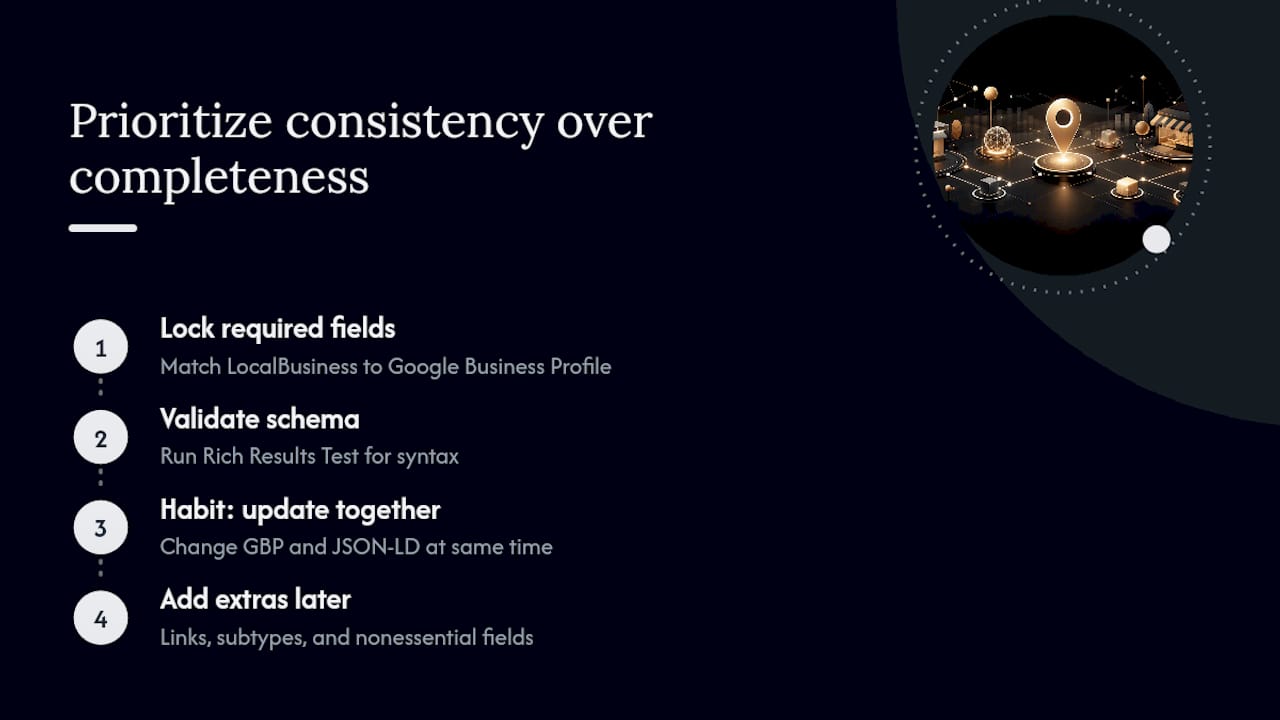
If you take one thing from this article, prioritize consistency over completeness. A LocalBusiness block with four accurate fields beats one with fifteen fields where three have quietly gone stale. Get the required properties locked to your Google Business Profile first, validate it, then build the habit of updating both together. Everything else, the sameAs links, the priceRange, the extra subtype properties, is worth adding once that foundation actually holds.
— Ruthwik
Get Your Local Business Schema Built and Monitored Correctly
An alternative to hand-coding and hoping for the best is a team that audits your existing markup, writes JSON-LD tied to your actual Google Business Profile data, and keeps checking Search Console after launch so drift gets caught before it costs you eligibility.

For businesses managing one location or fifteen, that ongoing monitoring is usually the piece that falls through the cracks once the initial code goes live. Local SEO work pairs schema implementation with the surrounding technical and content signals that determine whether your business shows up accurately in local search results, covering everything from NAP consistency across directories to the on-page structure search engines expect. If you want a second set of eyes on your current schema setup, or a full implementation from scratch, request an SEO quote and a digital marketing agency can map out what your locations actually need.
Sources
FAQ
Can You Give an Example of LocalBusiness Schema?
A basic example includes @type: "LocalBusiness" with name, address as a PostalAddress object, telephone, url, and geo coordinates, formatted in JSON-LD inside a script tag. The full annotated example appears earlier in this article and can be copied and adapted directly.
What’s a Simple Example of Schema Markup in General?
Beyond LocalBusiness, common schema types include Product for e-commerce listings, Article for blog posts, and FAQPage for question-and-answer content, each following the same @context and @type structure defined by Schema.org.
What Are the Best Practices for Schema Markup?
Match every field to visible, accurate content on the page, use the most specific subtype available instead of a generic type, keep NAP details identical across your site and Google Business Profile, and validate with the Rich Results Test before and after deployment.
Is FAQ Schema Still Worth Using?
FAQ schema still has valid use cases, though Google has narrowed how broadly it displays FAQ rich results in search, so treat it as a bonus rather than a guaranteed visibility boost. It still helps AI answer engines and search crawlers parse question-and-answer content accurately, which matters independent of whether a rich snippet appears.