Google Ads runs on three keyword match types: broad, phrase, and exact. Broad match casts the widest net and hands the most control to automation, exact match gives you the tightest control over who sees your ad, and phrase match sits in between. The right choice depends on how much data you have and how much risk you’re willing to accept in exchange for reach and Smart Bidding performance.
TL;DR:
- Broad match offers the widest reach but risks wasting budget on loosely related searches, especially if account data is limited.
- Phrase match requires the search to contain your exact phrase in order and balances control with reach; it allows additional words before or after.
- Exact match is best for high-value, high-intent keywords, but its matching now includes close variants and minor misspellings, reducing precision.
- Negative keywords, whether broad, phrase, or exact, effectively exclude unwanted searches and require ongoing review of search term reports.
- Using Smart Bidding with broad match can improve reach, but it depends on sufficient conversion data and proper account signals; tight control is needed for new or low-volume accounts.
Table of Contents
- What Are Keyword Match Types in Google Ads?
- Broad, Phrase, and Exact Match: Syntax and Real Examples
- Negative Keywords: How Exclusion Match Types Work
- Do Match Types Still Matter With Smart Bidding?
- Which Match Type Should You Use for Your Campaign Goal?
- How Do You Change Match Types in Google Ads?
- Common Match Type Mistakes and How to Fix Them
- Courimo’s Approach to Match Type Strategy
- What Actually Changes Once You Start Testing Match Types Yourself
- Get Expert Help Managing Your Google Ads Match Types
- Where to Learn More About Google Ads Match Types
- Sources
- FAQ
What Are Keyword Match Types in Google Ads?
Every keyword you add to a campaign needs a matching setting, and that setting decides which real user searches are allowed to trigger your ad. Think of it as a gatekeeper sitting between the words you bid on and the millions of ways people actually type or speak their searches. Without match types, “running shoes” would either need to match that exact phrase forever, or match everything remotely related to feet. Neither extreme works for a real budget.
The three types stack on top of each other. Broad match pulls in the widest set of queries, phrase match captures a subset of those, and exact match captures the narrowest slice. This matters because broader match types capture all the queries of narrower match types, plus additional related searches, which means adding the same keyword under multiple match types in one ad group usually just creates internal competition rather than more reach.
A few things ride on which match type you pick:
- Reach. Broad match shows your ad to more searches, phrase and exact show it to fewer.
- Relevance. Tighter match types tend to produce cleaner, more predictable search terms.
- Cost control. Loose matching can burn budget on searches that never convert.
- Quality Score signals. Click-through rate on irrelevant broad-match traffic can drag down the relevance scores Google uses across your whole account.
Broad, Phrase, and Exact Match: Syntax and Real Examples
Each match type has its own punctuation, and the punctuation is not cosmetic. It’s the instruction you’re giving Google’s auction system.
Broad match uses plain text with no punctuation at all: running shoes. This tells Google to consider the words as a general topic and match on meaning, not exact wording. A search for “best sneakers for jogging” can legitimately trigger that keyword because modern matching interprets the intent behind a query, using landing pages and account signals rather than literal syntax alone.
Phrase match uses quotation marks: "running shoes". The core phrase has to appear in the search, in that word order, though Google allows extra words before or after it. “Where to buy running shoes near me” matches. “Shoes for running a marathon” typically does not, because the word order breaks.
Exact match uses square brackets: [running shoes]. Despite the name, exact match isn’t quite as literal as it used to be. It still matches close variants like plurals, misspellings, and reordered words with the same intent, but it excludes searches with a materially different meaning. “Cheap running shoes” would not trigger [running shoes].
Here’s how the tradeoffs shake out in practice:
- Broad match: Best for discovery, top-of-funnel campaigns, and accounts with strong conversion data feeding Smart Bidding. Risk is wasted spend on loosely related queries.
- Phrase match: A middle ground for advertisers who want topic control without micromanaging every variation. Good for mid-funnel keywords tied to a specific product or service.
- Exact match: Best for high-value, high-intent terms, brand names, or tightly regulated industries where you need to know precisely which query triggered the ad. Risk is limited reach if you rely on it alone.
Negative Keywords: How Exclusion Match Types Work
Negative keywords are the mirror image of regular match types. Instead of deciding which searches can trigger an ad, they decide which searches never should. The same three levels of specificity apply.
A negative broad match keyword like free blocks any search containing that word, in any order, alongside other terms. A negative phrase match keyword like "free shipping" blocks searches containing that exact phrase in sequence, while still allowing “shipping is free with orders over $50.” A negative exact match keyword like [free] blocks only that precise search term.
Building a solid negative list usually starts with obvious junk: “jobs,” “reviews,” “DIY,” “free,” and competitor names you don’t want to pay for accidentally. From there, it becomes an ongoing habit rather than a one-time setup.
Pro Tip: Pull your search terms report weekly during the first month of any new campaign. That single habit catches wasted spend before it adds up, and it’s the fastest way to find your next round of negatives.
Do Match Types Still Matter With Smart Bidding?
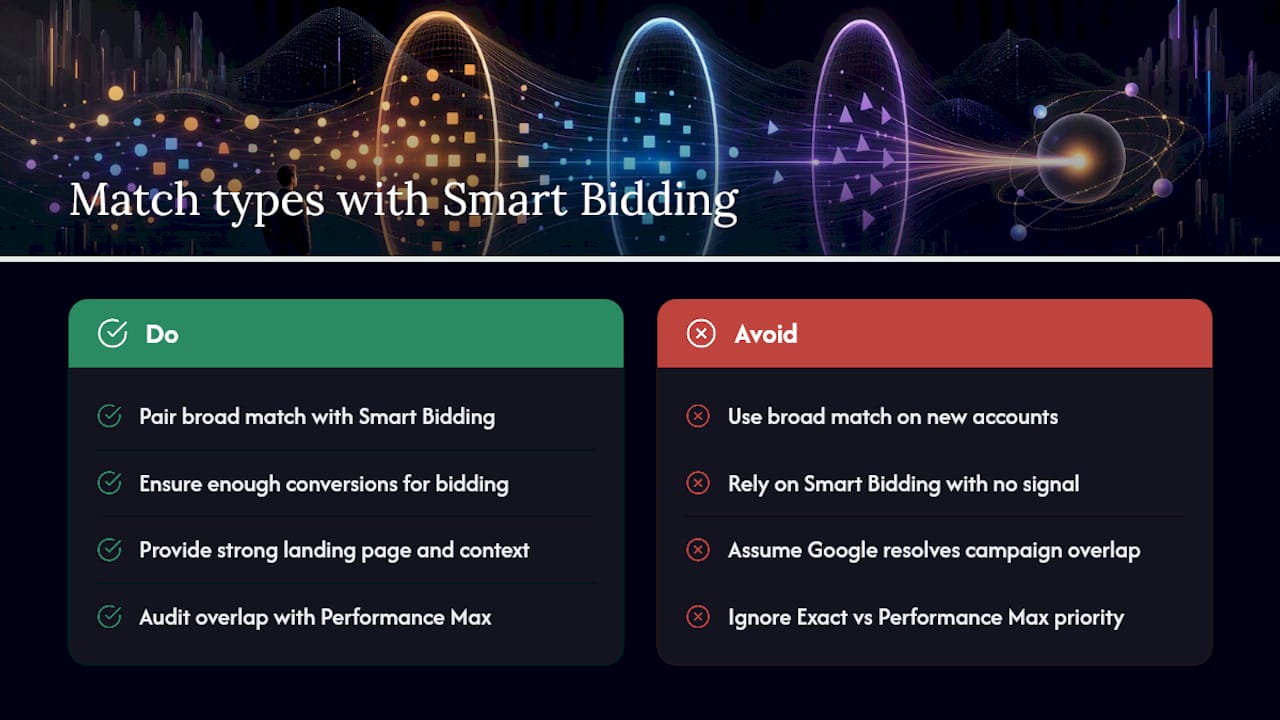
Yes, but the relationship has changed. Google now actively recommends pairing broad match with Smart Bidding, arguing that automation can improve both reach and performance toward the goals you’ve set, because the algorithm uses conversion data to decide which broad-match queries are worth showing your ad to.
This only works if you feed it enough signal. Smart Bidding needs a reasonable volume of conversions to optimize against, and it leans on account-level context, your landing page copy, your other keywords, and past search history, to judge whether a loosely related query is actually worth a click. A thin landing page or a brand-new account with no conversion history gives the algorithm very little to work with, which is exactly when broad match tends to misfire.
There’s also a priority layer worth knowing if you run Performance Max alongside standard Search campaigns. Exact match keywords in a Search campaign generally get priority when a query matches them precisely, while phrase and broad match can share priority with Performance Max search themes in overlapping cases. If you’re running both campaign types on similar terms, that overlap is worth auditing rather than assuming Google sorts it out perfectly on its own.
Which Match Type Should You Use for Your Campaign Goal?
Picking a match type isn’t really a keyword decision. It’s a strategy decision about how much risk you’re comfortable letting automation absorb. A useful way to work through it:
- Define the goal. Are you protecting brand searches, generating volume for a new product, or driving high-value leads where every click needs to count?
- Assess your risk tolerance. A $500 monthly budget can’t absorb the same experimentation a $20,000 budget can.
- Check your data depth. Accounts with months of conversion history can trust Smart Bidding with broader match types. New accounts should lean tighter.
- Match the type to the goal. Brand protection and high-value terms lean exact or phrase. Discovery and scale lean broad, paired with tight negatives.
A few signals that should push you toward exact or phrase rather than broad: a limited budget, a new account with thin conversion history, legal or regulatory sensitivity around what your ad can claim, or keywords tied to your own brand name where you don’t want competitors’ ads eating your traffic by association. Signals favoring broad: an established account with steady conversions, a Smart Bidding strategy already in place, and a genuine need to find new customer language you haven’t thought to bid on yourself.
In practice, a lot of accounts run a hybrid: broad match feeding discovery for general terms, with phrase or exact pockets locked around the keywords that carry the most revenue, an approach Google’s own guidance treats as a sound default rather than a compromise.
How Do You Change Match Types in Google Ads?
- Open Keywords under your ad group, select a keyword, and edit it directly or add a new one with the right punctuation (plain text, quotes, or brackets).
- For bulk changes, use Google Ads Editor or the bulk edit spreadsheet upload rather than editing one keyword at a time.
- Check the search terms report regularly to see which real queries are triggering your ads and adjust match types accordingly.
- If your account is running in Smart Mode, switch to Expert Mode first. Smart Mode hides granular match-type controls, and new keywords default to broad match unless you specify otherwise.
Common Match Type Mistakes and How to Fix Them
The most common mistake is treating match types as a set-and-forget setting rather than a living part of the account. Redundant keywords across match types, missing negatives, and an ignored search terms report are the usual suspects behind wasted budget.
Watch four numbers closely: click-through rate, conversion rate, cost per conversion, and the share of spend going to search terms you’d never have chosen manually. If cost per conversion is climbing while CTR looks fine, the problem is usually the match type letting in traffic that clicks but doesn’t convert. When you spot that, tighten the match type, add negatives, and give the change at least a week or two of data before judging it.
Courimo’s Approach to Match Type Strategy
Agencies that manage this daily tend to structure ad groups around single themes, run search-terms audits on a set schedule, and blend match types rather than picking one for an entire account. Some agencies start broad-first for discovery, then lock in phrase and exact pockets once a keyword proves its value.
Pro Tip: If a broad-match term converts well for three straight weeks, promote it into its own exact-match ad group. You keep the discovery upside without gambling your best-performing terms on ongoing automation.
What Actually Changes Once You Start Testing Match Types Yourself
Most guidance on match types reads like a settled science, but real accounts rarely behave that cleanly. The honest approach is to treat every match-type change as a hypothesis, not a fix: predict what should happen, check the search terms report against it, and adjust. Automation has genuinely earned its bigger role, but it still performs best when a person is watching the data feeding it, not walking away from it.
— Ruthwik
Get Expert Help Managing Your Google Ads Match Types
Getting match types right takes ongoing attention that most business owners simply don’t have time for between running the actual business. Some agencies manage Google Ads (PPC) campaigns for small and medium-sized businesses, building hybrid match-type strategies, broad for discovery, exact and phrase for the keywords that matter most, like described in this guide.
Rather than leaving Smart Bidding to guess with limited data, campaigns built around clear conversion goals from day one with regular reviews of search-terms data tend to avoid wasted spend. That combination of automation and manual oversight is exactly what stops broad match from turning into wasted spend. If you want a second set of eyes on your current match-type setup, or you’re starting a Google Ads account from scratch, consider professional digital marketing agencies that can provide strategy sessions and clear reads on where your budget is actually going.
Where to Learn More About Google Ads Match Types
For deeper reading straight from the source, Google’s keyword matching options guide and search terms report help page are the two most useful official references to bookmark.
Sources
FAQ
What Is a Match Type in Google Ads?
A match type is a setting on each keyword that controls how closely a person’s search has to align with that keyword before your ad is eligible to show. Google Ads uses three levels: broad, phrase, and exact, with broad match applied by default when no match type is specified.
What Are the Negative Keyword Match Types in Google Ads?
Negative keywords come in the same three flavors as regular keywords: negative broad, negative phrase, and negative exact. Negative broad blocks any search containing those words in any order, negative phrase blocks that exact phrase in sequence, and negative exact blocks only that specific search term.
What Is AI Max in Google Ads?
AI Max is a Google Ads feature set built to extend Search campaign reach by using account signals, landing pages, and creative assets to find relevant queries beyond a keyword list’s literal syntax. It reflects the same shift toward intent-based matching that already shapes how broad match behaves.
Should I Use Broad Match or Exact Match for a New Campaign?
New campaigns with little or no conversion history usually do better starting with phrase or exact match, since Smart Bidding has no data yet to guide broad match safely. Once you’ve built a few weeks of conversion data, broad match paired with Smart Bidding becomes a stronger option for scaling reach.
How Often Should I Review My Search Terms Report?
Weekly reviews work well for new or recently changed campaigns, since that’s when unexpected queries and wasted spend tend to show up first. Established, stable accounts can often shift to a biweekly or monthly cadence once the negative keyword list is mature.